Helm 2.4: Team Roles, Faster Releases, Better Pages
Give every teammate a Helm that fits their role, move between releases faster, and test, preview, and price your App Store pages with more control.
Helm 2.4 is here, and it gives you more ways to test and shape your App Store listing. Product Page Optimization lets you run tests with different screenshots, App Previews, and headers, and Custom Product Pages give each campaign a page of its own.
Team roles give everyone on your account a Helm that matches the work they do, and moving between releases should feel quicker too.
We’ve also continued the pricing work from Helm 2.2 and brought more creative tools to iOS, including iPhone Duo.
There’s a lot to share, so let’s get into it.
A Helm That Fits the Work
Support lives in reviews. Marketing lives in listings, screenshots, and events. Admins need the settings everyone else can leave alone.
Team roles let you switch into the layout that fits that work. Sidebar items and feature access follow the role, so people see the Helm they need. You can configure roles in a setup file, which means a new machine can start in the right place. When something needs a closer look, diagnostics follow the role you’re using.
Pick Up Where You Left Off, Faster
Switching between releases shouldn’t mean waiting for the same details to load again. On macOS and iOS, Helm now remembers versions you’ve already opened during your session, so returning to one feels much quicker.
On iOS, your cached release metadata is ready when the editor opens, while the remaining details load in the background. You can keep moving between tabs as that happens, and refreshing a release preserves your drafts.
These are the kinds of improvements you’ll feel every day, especially when you’re working across several apps and releases.
Find the Product Page That Connects
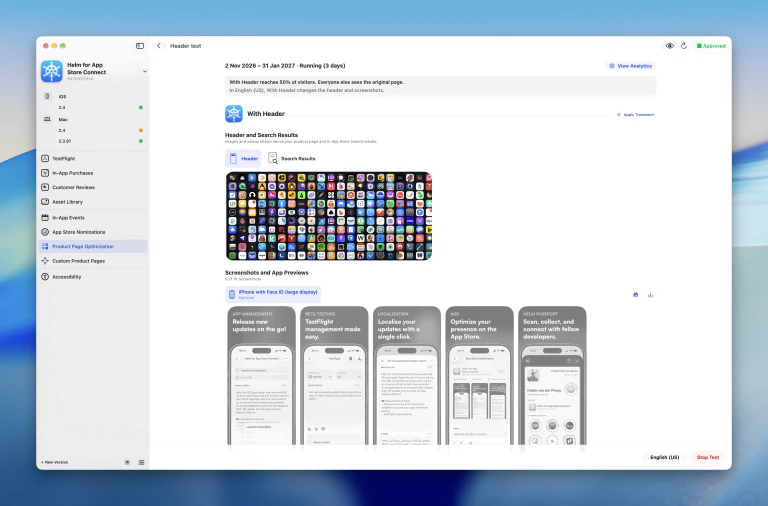
Which screenshots tell your app’s story best? Does a different header help people understand it? Product Page Optimization tests are now available in Helm on macOS and through helm-asc, so you can explore those questions without leaving your release workflow.
Create a test, choose how much traffic it receives, and prepare localized treatments with different screenshots, App Previews, and header or search result creatives. On macOS, the original product page stays visible for comparison, and Helm explains who sees each treatment and what changes in the selected language.
You can submit, start, and stop tests from Helm. When you’re ready to use a treatment, apply it to an eligible app version. You can also jump to the test’s analytics in App Store Connect to review its performance.
Give Every Campaign Its Own Page
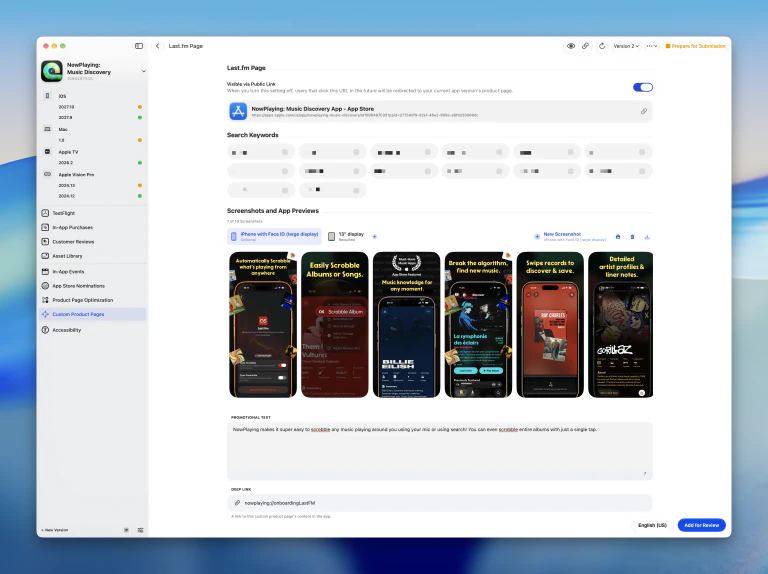
A campaign for one feature might need a different story from your main App Store page. Helm 2.4 adds Custom Product Pages on macOS and in the CLI, so you can prepare a page around the audience you’re trying to reach.
Create or duplicate a page, customize its localized promotional text, screenshots, and App Previews, and manage its deep link and search keywords. You can browse previous page versions, prepare a new one after approval, and include it in a review submission.
Whether you’re highlighting a new feature or preparing your next campaign, you can keep that work alongside the rest of your app in Helm.
See Your Listing Before You Ship
Your screenshots, name, and subtitle all work together. Now you can see that full picture with a dedicated Preview page on macOS, available from a version, Custom Product Page, or Product Page Optimization test.
Switch between product page and search result previews, try different languages, and check light and dark appearances. You can preview iPhone, iPhone Duo’s outer and inner displays, and iPad, as well as Mac App Store search results.
You can also try changes to text and media in the preview, then save eligible edits when you’re happy with them. Export the visible result as a PNG to share with your team or compare different directions.
Using an agent? The CLI can export previews of saved listings too, so reviewing the result can be part of your automated release workflow.
Room to Work on iPhone Duo
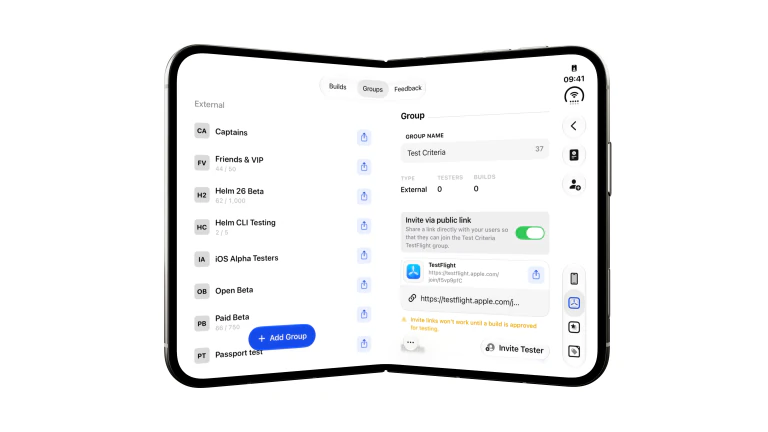
We’ve adapted Helm to make better use of the extra space when you open your iPhone Duo.
When you’re editing your App Store listing on the inner display, the preview sits beside your details. You can see how your name and subtitle work together while you edit them. Discounts also makes use of the wider layout, with your list and selected offer side by side.
Pricing That Fits Your Products
In Helm 2.2, we brought in-app purchases and subscriptions into Helm. With 2.4, we’ve focused on giving you more flexibility as your catalog grows, on macOS and through the CLI.
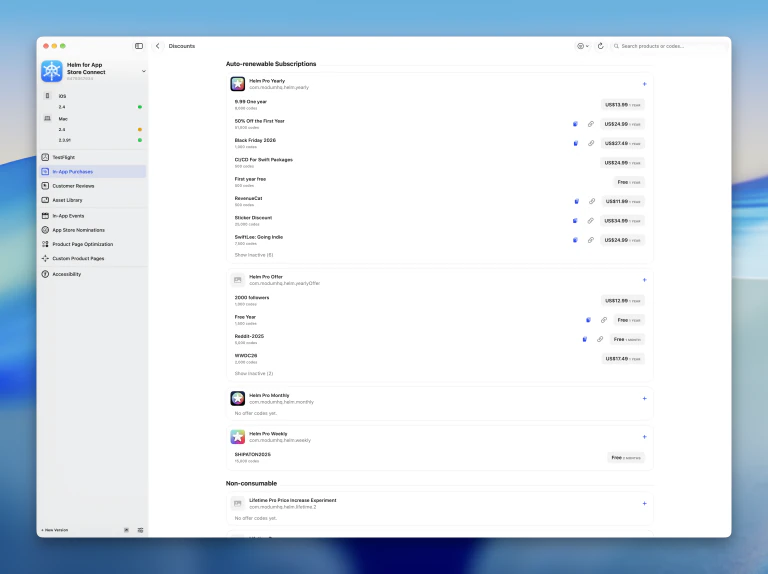
Your Discounts, Together
The new Discounts page on macOS brings offer codes from across your products into one place. Browse existing codes, create new ones, and copy them without opening each product individually.
Change One Price, Keep Others in Step
With linked pricing, you can set one product’s price relative to another using a multiplier. For example, your annual subscription could follow your monthly price, with a lifetime purchase following the annual one.
When you change the source price, Helm previews the prices of the products following it before you apply anything. You can apply or schedule those changes together, and the Product Links screen in Settings gives you an overview of the relationships across your account. Creating links requires Helm Pro.
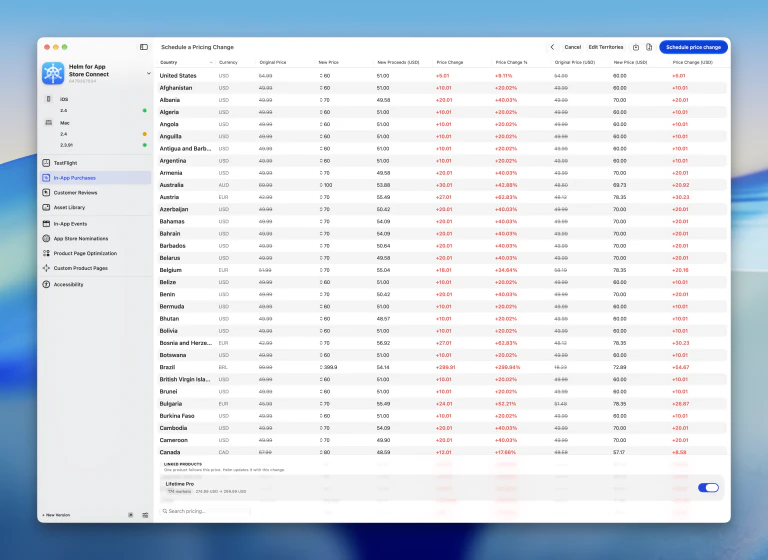
Different Markets, Different Starting Points
Tiered pricing lets you group territories and give each group its own pricing approach. Set different base prices, apply percentage adjustments, or copy another product’s prices with a different multiplier for each tier.
You can save territory groupings to reuse across products, then review the calculated prices before applying them. We’ve also refreshed the Purchasing Power Parity indices, so your next regional price calculation uses updated data.
Linked pricing, tiered pricing, and the updated PPP calculations are also available through helm-asc, with previews before you apply changes.
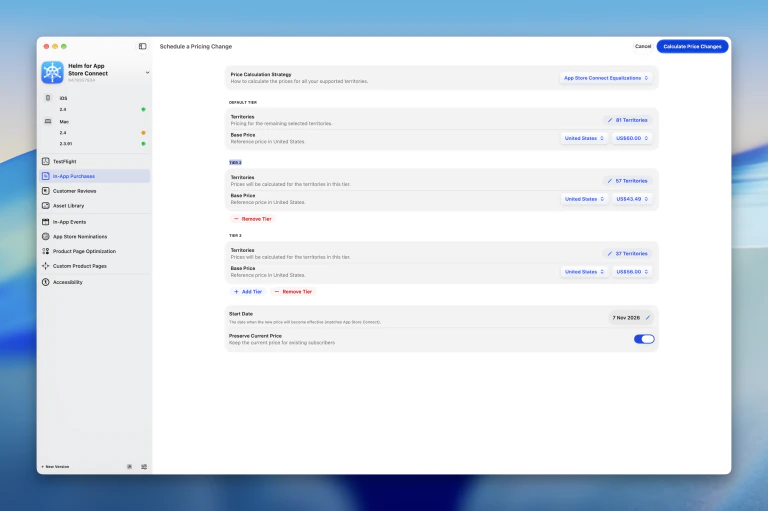
Bring Your First Products Along for Review
Your first product of a type may need to go through review with an app version. Helm now guides you through that flow, letting you select products and keep them with the version you plan to submit.
You can also stage products that still need work and see what remains before they’re ready. When it’s time to submit the app version, Helm warns you if eligible products that need it would be left behind, so you have a chance to include them.
The CLI supports these submission flows too, including a dry run of the warning before adding a version to a submission.
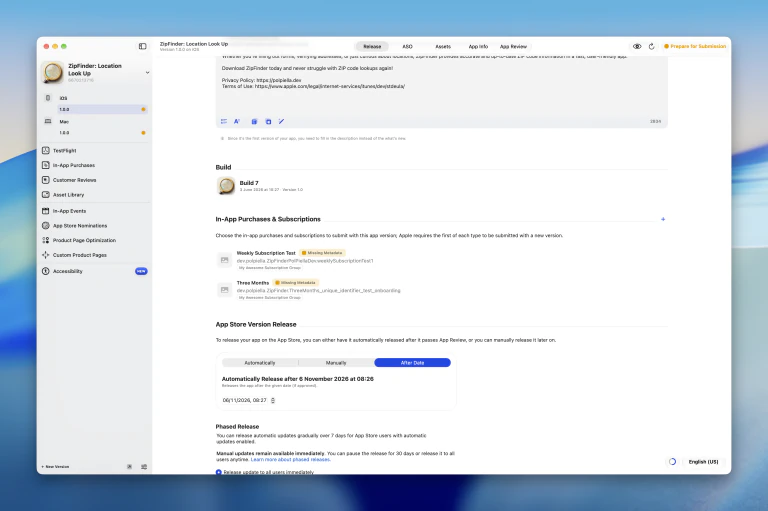
Upload Once, Use Your Assets Again
The new Asset Library on macOS gives your app’s media a home beyond a single release. Browse screenshots, including iPhone Duo sizes, App Preview videos, and creative images, then reuse compatible assets where you need them.
You can pick library assets for versions, Custom Product Pages, Product Page Optimization treatments, and In-App Events. Search and filters help you find the right file, and asset details show where it’s already being used, plus sizing guidance so you know what fits before you place it.
Removing an asset from a page doesn’t mean throwing away the reusable file. You can keep your library organized, archive assets, and bring them back when you need them. The CLI also supports browsing, uploading, downloading, and placing library assets.
We’ve brought more asset support to iOS too, including header and search result images and videos, plus all four iPhone Duo screenshot sizes.
Plan Your Next Event with a Clearer Calendar
In-App Events on macOS have a new date picker that brings publish, start, and end dates onto one calendar. You can see the promotion and event ranges together, use shortcuts for dates and durations, and check other scheduled events as you plan.
You can also pick photos from Unsplash when an event needs an image, without leaving Helm to search your camera roll.
We’ve also brought the Launch List to events. It walks you through missing text, media, dates, badges, and availability before you submit, just as it does for your app releases.
Alongside the new calendar, we’ve fixed issues with date validation and scheduling, including specific times and daylight-saving changes. Those validation improvements apply to the CLI too.
Turn Customer Feedback into Something You Can Find
Customer reviews often contain ideas you’ll want to come back to. You can now bookmark reviews with tags or folders, and filter by those tags, so a feature request or a recurring issue doesn’t disappear into your inbox.
On macOS, use the Tags menu or add tags as search tokens to find related feedback. The CLI can also list the tagged reviews saved in Helm on your device, giving your agents a way to work with the feedback you’ve organized.
When Helm drafts a reply, you can set the length and choose a tone preset. Short and direct for one review, warmer for the next, without starting the prompt over each time.
Choose the AI You Like Working With
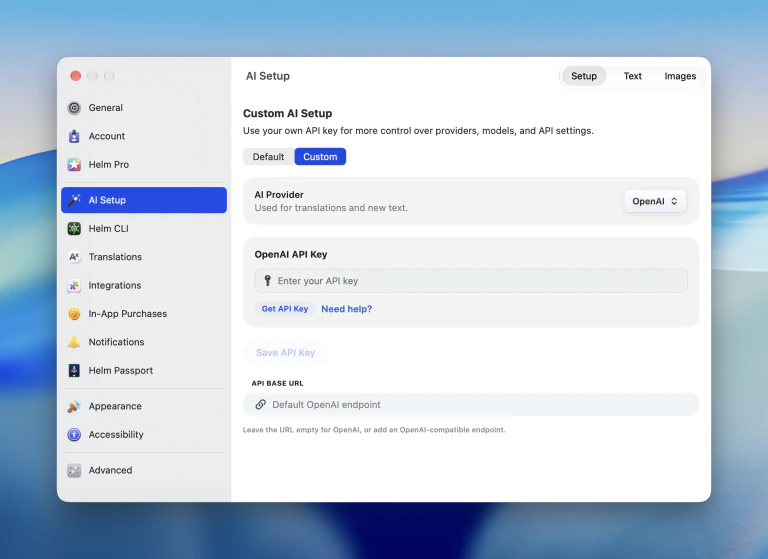
You now have more choice when translating and polishing your App Store text. Anthropic’s Claude and Apple Foundation Models join OpenAI as provider options on macOS and iOS.
Keep Helm’s ready-to-use Default setup, or choose Custom in AI settings to select a provider and model and add your own API key. Helm remembers separate keys and models for each provider, so switching doesn’t mean setting everything up again.
Volume Purchasing for Schools and Businesses
Some apps are bought by an organization, not one person at a time. If schools or businesses get your app through Apple Business Manager or Apple School Manager, you can now set up Volume Purchasing in Helm.
Learn From a Rejected Build
When a build is rejected, you can share the reason with us. That feedback stays with the release and helps us see where review gets in the way.
Other improvements
- App Store navigation, account switching, launch, and the toolbar are clearer. Login and subscription-environment detection are more reliable, including for grandfathered accounts.
- Grandfathered customers get CSV import, setup-file support, and unlimited accounts.
- Role descriptions are clearer, and Helm explains when a feature isn’t available to you.
- Review reply templates can match the review’s language, titles stay concise, and exporting reviews is simpler. You can include support details in a reply, and review cards show the app version and platform.
- Chinese translation is more reliable, and switching AI models is smoother.
- Subscription prices are more accurate, and CSV validation tells you what to fix.
- App Nominations support calendar actions, templates, and filtering, with clearer treatment details.
- In-App Event eligibility, dates, status, and time zones are handled more reliably.
- Duplicate submission alerts show up less often, and URL checks hold up on restricted networks.
- You can upload App Previews for macOS apps.
- The age-declaration questionnaire is clearer, with better explanations and support for new questions.
- Subscription apps warn you about the EULA.
- Guidance around beta versions of Xcode is more specific.
- Background report requests are steadier, as groundwork for analytics.
Update Helm on your Mac and iPhone to try 2.4, and let us know what you think through in-app feedback. We can’t wait to see what you ship with it.