
Polish how your app shows up on the App Store.
Name, subtitle, keywords, and tags shape discovery. Helm gives you clear editing, character guidance, and a preview of how the listing reads before you ship.
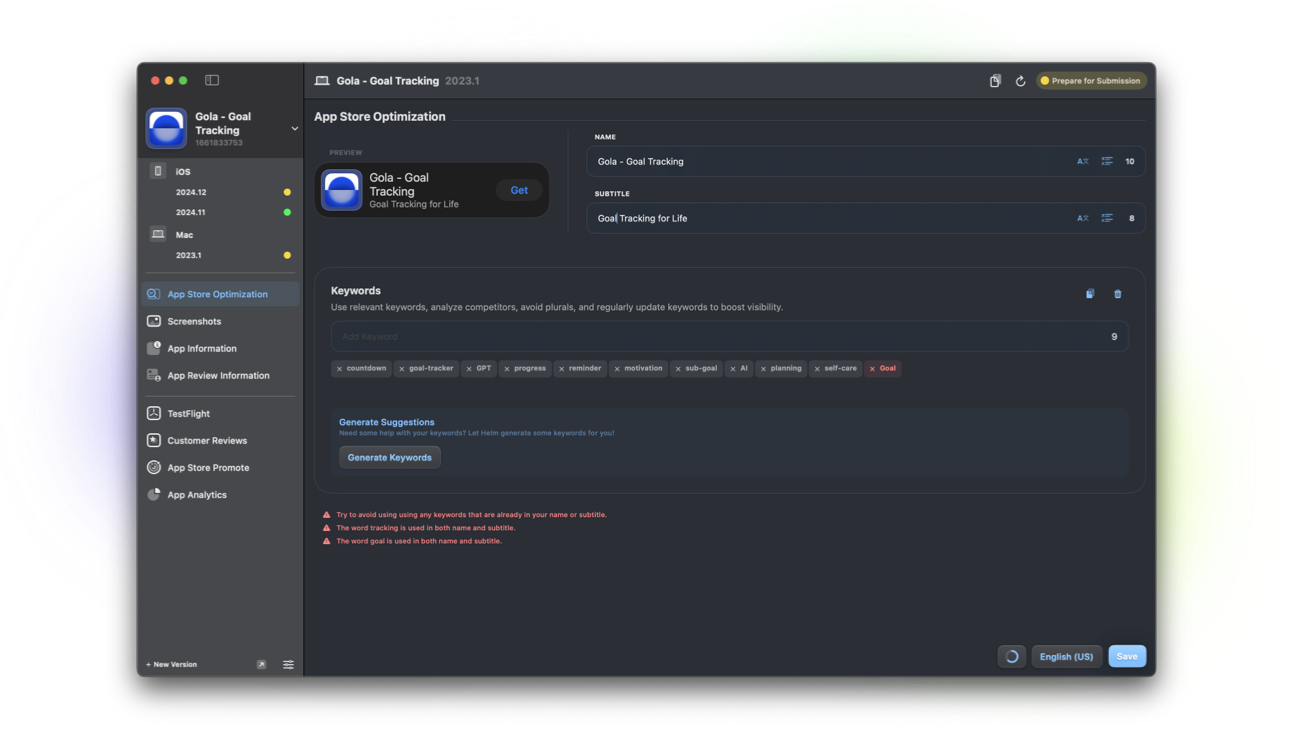
Name, subtitle, and keywords that fit
Edit your app name and subtitle with character guidance so you stay inside App Store limits. Manage keywords with related suggestions and clearer visibility into what still fits.
ASO tips show up when you update keywords, title, and subtitle, so small listing changes feel intentional instead of guesswork.
Tags and product page preview
Manage App Store tags alongside the rest of your listing. Preview the product page and search result look so you see what shoppers see.
Tags are available on Mac, iPhone, and through the Helm CLI when you automate listing updates.
Localize and improve listing copy
With Helm Pro, improve or translate listing text with AI without leaving the app. Write once in your primary language, then reach every market you support.
Pair listing work with screenshots and releases so metadata and media stay in sync for the same version.
Where store listing works
Full listing and ASO workflows live on macOS. The iOS companion covers the edits you need on the go. CLI support covers tags and related localization workflows.
FAQ
Does Helm help with ASO?
Yes. You get character guidance for name and subtitle, keyword suggestions, App Store tags, product page preview, and ASO advice when you update listing fields. AI keyword generation and text improvements are Pro features.
Can I preview my product page?
Yes. Helm includes a sneak peek at your App Store product page and search result look while you edit the listing.
Can I manage App Store tags?
Yes. Find and manage Apple’s App Store tags for your app from the ASO view on Mac and iPhone, and via helm-asc.
