App Store keywords
The App Store keyword field is a comma-separated list (up to 100 characters) that helps Apple match your app to relevant searches. It is invisible on the product page but central to ASO. Helm helps you generate and refine keywords while you edit the rest of your listing.
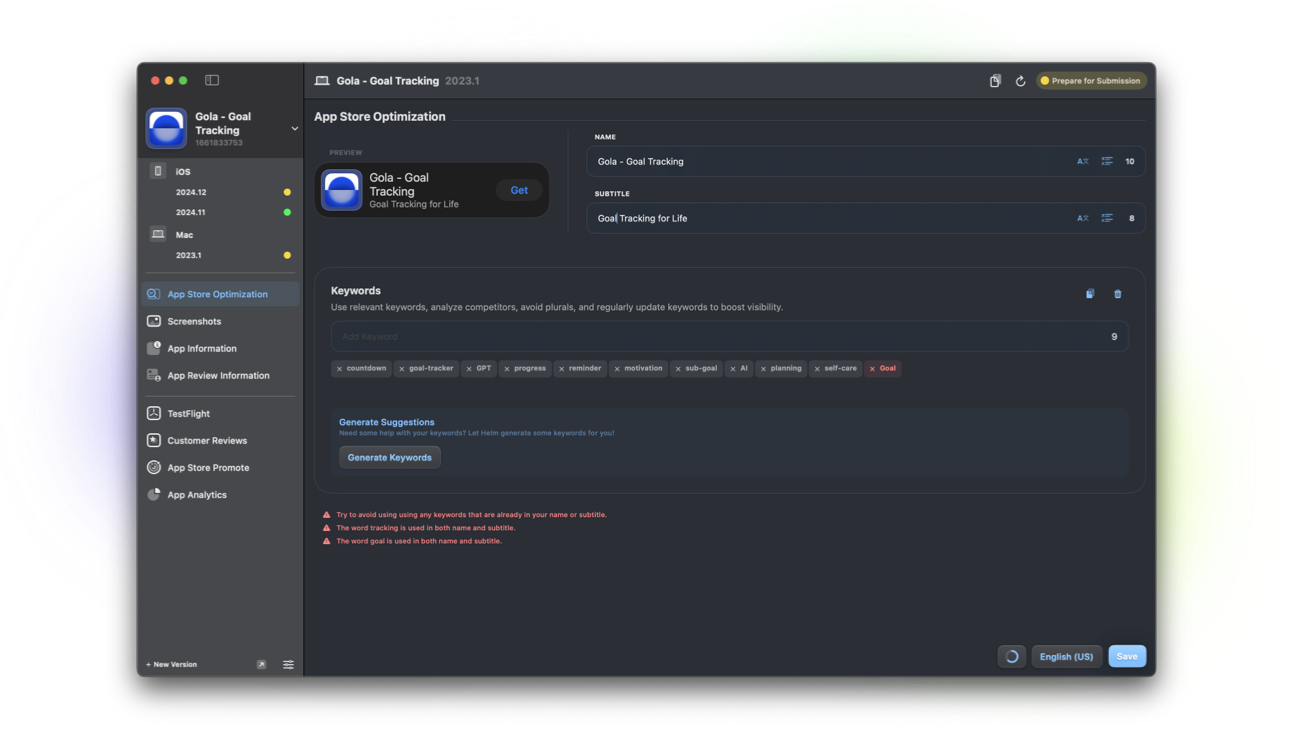
What the keyword field is
Keywords are metadata Apple uses for search relevance. Shoppers never see the raw list. Your app name and subtitle also contribute strongly to discovery, so keywords should complement them, not repeat them blindly.
You get 100 characters. Commas separate terms. Spaces count. Precision matters more than packing every synonym.
Why it matters when you ship
Keywords are easy to neglect until growth stalls. A release that adds a new audience or feature is a natural time to revisit the list.
Irrelevant keywords that drive the wrong downloads hurt ratings. Aim for intent that matches what the app delivers.
How Helm helps
When you update keywords in Helm's store listing flow, you get ASO-oriented advice and AI help to brainstorm terms (Pro). Preview how the broader listing reads together.
Combine keyword work with localization. Each locale can use different terms that match how people search in that market.
Practical keyword habits
Skip plurals and spaces when Apple already matches variants. Avoid competitor trademark games that create review risk.
Keep a living note of terms that convert. Refresh thoughtfully instead of rewriting the whole field every week.
FAQ
Should I put my app name in keywords?
Usually no. Name and subtitle already carry that weight. Use the keyword field for additional relevant terms.
Do keywords need a new version to change?
Yes. Keyword changes typically ship with an app version submission, unlike promotional text.
Can Helm guarantee higher rankings?
No. Helm helps you craft clearer metadata. Rankings depend on relevance, quality, and many signals Apple does not fully disclose.
