
Screenshots that land in the right place.
App Store media should feel organized, not chaotic. Helm groups screenshots by device, keeps order clear, and helps previews look ready before you submit.
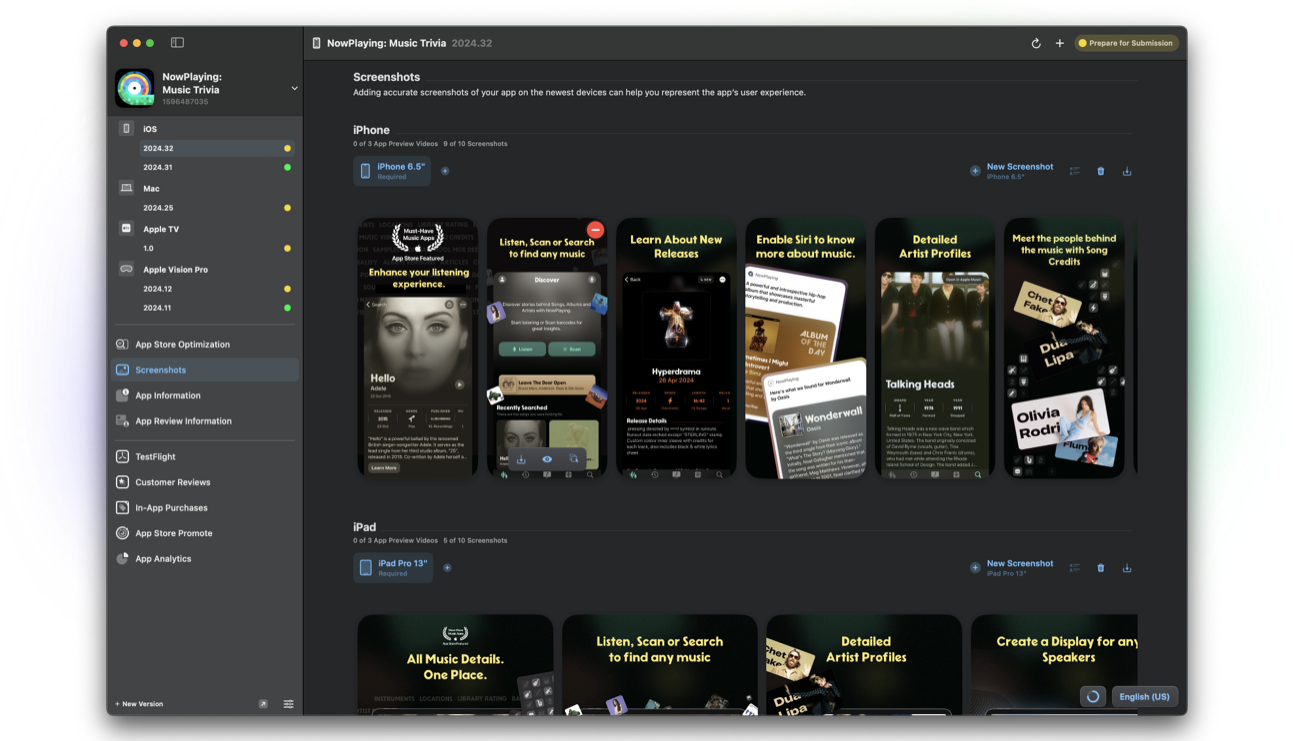
Groups by device
Manage screenshot groups for iPhone, iPad, and other display types. Each size includes clear device guidance so captures match what App Store Connect expects.
Open screenshots in a large preview window on Mac when you need to inspect detail before you upload.
Upload, reorder, and Magic upload
Drag, drop, and rearrange images. Helm can auto-remove alpha channels and accept visionOS simulator captures with resizing handled for you.
Magic upload sorts images based on filename and dimensions, then places them in the correct size, locale, and order. Less manual slot-filling. More time shipping.
- Bulk download or delete assets for a version
- visionOS simulator support with automatic resizing
- Upload and organize media from Mac or helm-asc
App preview videos
Add preview videos, set poster frames, and tweak timecodes so the first frame sells the story you want.
The fuller editor lives on macOS. iOS supports lighter screenshot work when you need a quick fix away from your Mac.
FAQ
What is Magic upload?
Magic upload detects screenshot size and filename cues, then places images into the right device group, locale, and order so you spend less time dragging assets into slots.
Can I manage app preview videos?
Yes. Add preview videos, set poster frames and timecodes, and validate playback as part of your version media on Mac (with CLI support for upload and organization).
Does screenshot management work on iPhone?
iOS includes limited screenshot support for on-the-go updates. The full editor for upload, reorder, and richer media workflows is on macOS.
