App preview
An app preview is a short video on your App Store product page that shows the app in motion. It sits with your screenshots and often plays muted with captions. Helm helps you manage preview media alongside screenshot groups so device sizes and locales stay organized.
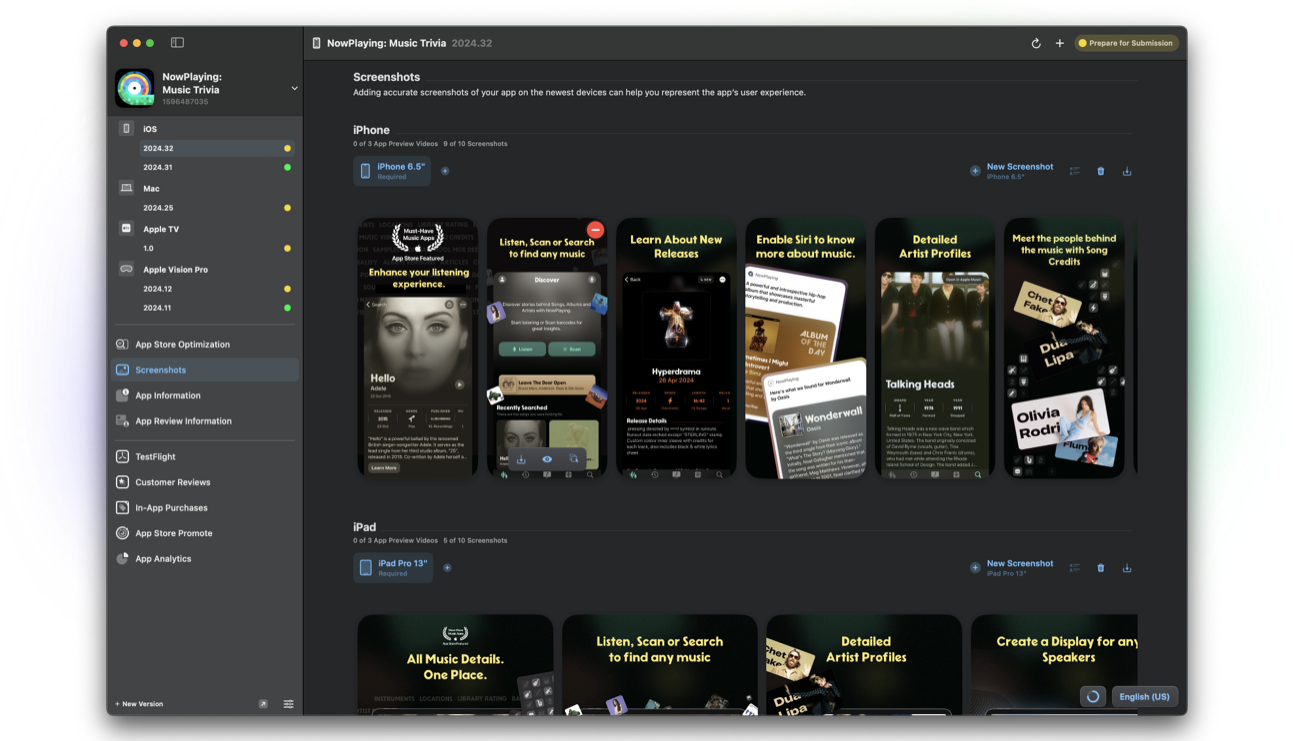
What an app preview is
App previews are brief videos that demonstrate your app's UI and flow. They appear in the same media gallery as screenshots on the product page and in some search results contexts.
Apple enforces length, resolution, and device-specific requirements. Portrait and landscape rules differ by device family.
Why it matters when you ship
Motion shows pacing and interaction that still frames cannot. For tools, games, and creative apps, a preview often answers "how does this feel?" in seconds.
A preview that mismatches your screenshots or current UI confuses shoppers. Update media when the experience changes.
How Helm helps
Helm's screenshots workflow covers screenshot groups and preview videos together. Magic upload, ordering, and locale-aware placement reduce the classic ASC pain of files landing on the wrong size.
Pair previews with strong stills and clear ASO text so the whole gallery tells one story.
Preview tips that age well
Show the core job in the first seconds. Add captions because many people watch muted. Avoid clickbait that the binary cannot deliver.
Keep a source project for each device class so the next release is a refresh, not a rebuild from scratch.
FAQ
Are app previews required?
No. Screenshots are required for most apps. Previews are optional but useful when motion clarifies the product.
Can I use the same preview for every localization?
You can reuse media across locales when the UI is universal, but localized captions or UI may deserve locale-specific previews.
Do previews need App Review?
Preview media ships with your version metadata and is reviewed as part of that submission.
