App Store screenshots
Screenshots are the required still images on your App Store product page. They do more selling than almost any paragraph of description. Helm helps you arrange, replace, and upload screenshots across devices and locales without the usual App Store Connect friction.
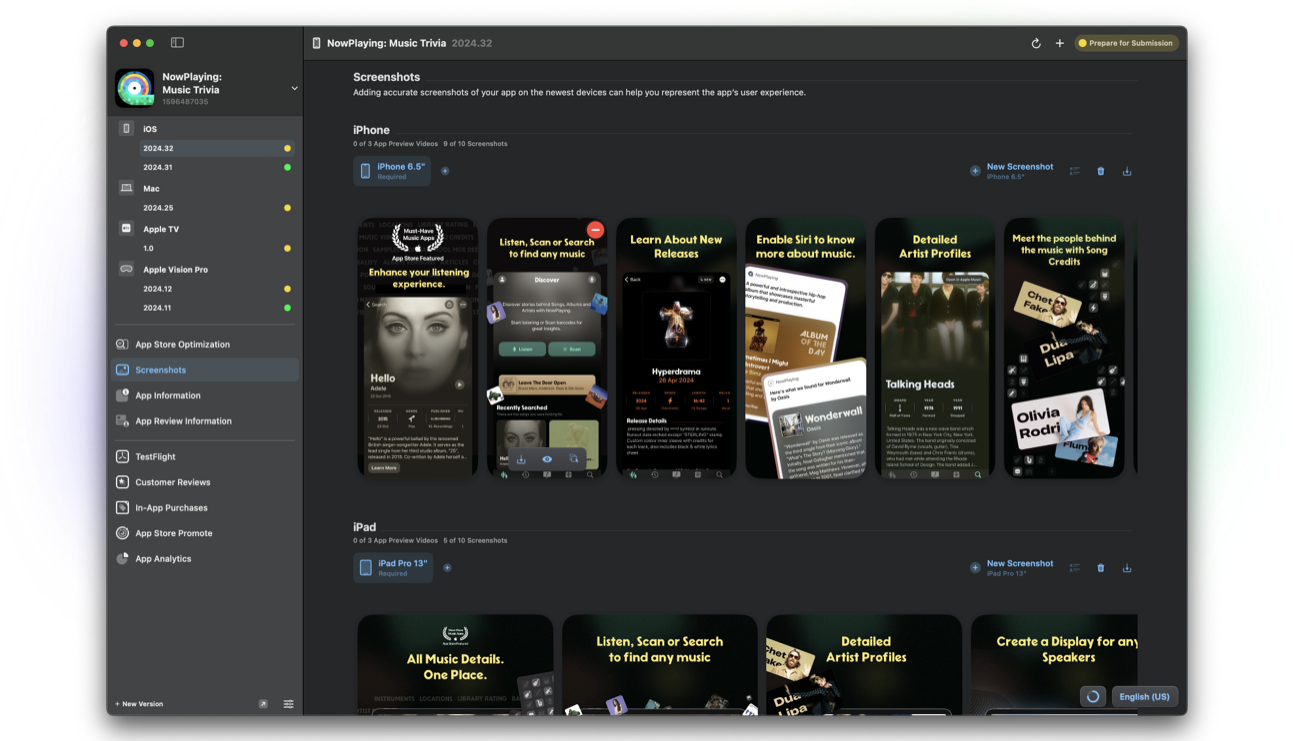
What App Store screenshots are
Screenshots show your app's UI for each required device size class. Apple enforces exact resolutions. Transparency is not allowed. Order matters: the first frames carry the most weight in search and browse.
You can also add app preview videos in the same media sets.
Why it matters when you ship
Outdated screenshots that show removed features create support tickets and bad first impressions. Treat creative updates as part of the release, not a someday task.
Localized screenshot sets often outperform translated captions on a single global set, especially for consumer apps.
How Helm helps
Helm's screenshots feature supports groups by device, reordering, alpha removal, visionOS simulator sizes, and Magic upload so files land on the right size, locale, and order.
That is the difference between a ten-minute media refresh and an afternoon of ASC drag-and-drop.
A simple creative checklist
Show the primary job in frame one. Keep text large enough for phone search results. Match the story in What's New when you highlight a new feature.
Export a named archive per release so you can roll back if App Review or marketing needs the previous set.
FAQ
How many screenshots do I need?
Apple requires a minimum per device family and allows additional frames up to the current limit. Check App Store Connect for the sizes your app supports.
Can Helm redesign my screenshots?
Helm manages upload, organization, and technical compliance. You still create the visual design in your design tools.
Do screenshots require a new version?
Screenshot changes ship with a version submission. Plan creative with the binary you are about to release.
